XA77x9.5
Repair and service
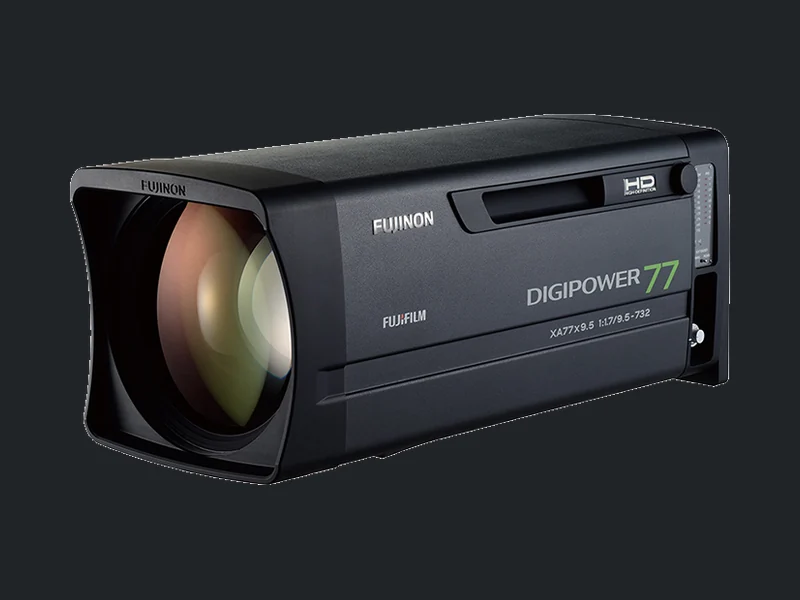
Fujinon XA77x9.5 is a HD studio / outside-broadcast BOX lens. 77× zoom with a 9.5–732 mm focal range before an extender is engaged.
Versions and controls
XA77x9.5BESM
A BOX lens must be considered as a system: lens, camera adapter, zoom and focus demands, cables and CCU. Working iris control or a lit controller does not establish that every control channel is correctly configured. Before shipping, we agree which accessories to include and how to transport the lens safely.
Find my symptom ↓Possible fault symptoms
Identify your symptom and tell us when it occurs. These are assessment topics, not a list of known recurring defects of this model.
Lens zoom not working?
The lens does not respond to a zoom command or stops before reaching the required framing.
Tell us whether zoom fails at the lens, through an external demand, or both. Check only external operating modes and connections described in the exact version’s manual. If the symptom persists, we can arrange assessment of the lens, drive and control chain. The symptom alone does not identify a part that needs replacement.
Zoom is jerky, drifts or only moves in one direction?
Zoom jumps, creeps in or out with no command, or moves in the same direction for both control inputs.
Record which control and speed reveal the symptom. Include a short video if it is safe to reproduce, and mention any programmed zoom functions in use. Do not open the demand or adjust internal potentiometers. Settings, the demand, cable and lens drive need to be distinguished before a repair is specified.
Zoom or focus demand not responding?
The controller is powered but commands do not reach the lens; operation at the lens may differ from operation at the demand.
Include the complete lens, drive, demand and cable identifiers, plus connector photographs. Connector shape or pin count alone does not establish compatibility. Focus control depends on the version and fitted accessories. Do not rewire connections or experiment with unverified adapters.
Lens loses focus when zooming?
The image is sharp at telephoto but soft at wide angle, or the other way round. Looking for back-focus adjustment?
This alone does not prove a fault: back focus may need setting for the particular camera and lens combination. Tell us the camera model, any adapter and whether the issue started after changing cameras. If adjustment following the manufacturer’s instructions will not hold, request an assessment. Do not dismantle the optical assemblies.
Back focus will not adjust or stay locked?
The setting changes after locking, there is play, or the available adjustment does not bring the image into focus.
Describe whether it repeats with the same camera and whether the lens has suffered an impact. Do not try to remove play by overtightening screws or dismantling the mount. Include both camera and lens models. Assessment determines whether setup, mounting checks or specialist optical work is appropriate.
Servo focus not responding?
The focus drive does not respond or its movement differs from the demand input.
This applies only to a servo-focus version or a correctly fitted external focus module. Supply the full drive and demand identifiers. A manual-focus version without the required module is not faulty simply because it ignores an electronic command. Once the configuration is established, we can arrange control or drive assessment.
Iris or CCU aperture control not working?
The iris does not respond, exposure changes unevenly, or aperture position data is missing at the camera.
Tell us whether manual, automatic or remote control fails, and identify the camera and CCU. Check external mode selection against the manual. Loss of CCU control alone does not prove an iris mechanism fault. If it persists, we arrange assessment of the control chain and lens; do not touch the iris blades.
Zoom mechanism is stuck or making unusual noise?
Movement stops, or there is new grinding, clicking or resistance.
Stop testing and do not force movement. Do not try to free a jam by repeatedly driving the servo. Send a photograph of the model label and describe when the problem began. Initial assessment helps route the lens to the right specialist; cleaning, lubrication or replacement parts are agreed after diagnosis.
Lens dropped, or image quality changed after an impact?
Sharpness, control or ring movement changed after an incident, even though the housing may look intact.
Stop using the lens and arrange an assessment. Describe the impact and send photographs of the exterior. Do not open the housing or try to straighten the mount. Repair feasibility, parts and a quotation depend on examination of the actual lens.
Moisture inside the lens or persistent fogging?
You can see moisture or fogging that persists after rain, storage or a temperature change.
If water ingress is suspected, switch the equipment off and do not power it up for tests. Tell us when and how the issue appeared. Do not open or heat the lens, or attempt to clean internal optical surfaces. Contact us for handling and service-intake guidance.
Do not dismantle the lens yourself.
A broadcast lens is a precision optical and mechanical system. Small changes to lens positions or internal adjustments can affect image quality. Incorrect dismantling can damage assemblies and increase the cost of repair.

Controlled cleanliness
Protected work areas, clean gloves, contained hair and low-lint clothing reduce the risk of dust, hair and skin oils contaminating internal optics.
Moisture control
Moisture and condensation can damage internal parts. Persistent damp conditions can also encourage fungal growth. Suitable working and storage conditions matter.
Optical precision
Optical alignment, focus and image quality are checked after the work. This requires measurement benches and procedures appropriate to the model. Reassembling the housing alone is not enough.
Initial diagnosis in Vilnius. Repair at the manufacturer’s laboratory.
We carry out initial diagnosis in Vilnius. Internal cleaning, optical adjustment and specialist repairs are arranged through manufacturers’ service laboratories. We select the nearest laboratory equipped for the specific model and work. Only occasionally do we carry out simple work locally, where specialist optical equipment is not required.
A safe first step: record the complete model code, external mode settings, camera and demand models. Inspect connectors only externally with equipment switched off; do not attempt internal contact or wiring repairs.
Request service ↗Care and inspection interval
Inspection timing depends on the exact version, its manual and operating conditions. Maintenance does not necessarily mean a complete strip-down or parts replacement. If a fault appears, do not wait for a scheduled inspection.
Store capped and protect against impact and moisture. Clean external surfaces as directed by the specific operation manual; leave internal cleaning and lubrication to service.
Maintenance source listed for this versionManufacturer documentation
Match the document to the complete lens and drive code. An operation manual or brochure is not a factory repair manual.
From symptom to an agreed repair
- 01
Enquiry
We receive the model, configuration and symptom details, then agree what to send.
- 02
Assessment and quotation
Initial diagnosis takes place in Vilnius. Specialist work goes to the nearest suitable manufacturer service laboratory. Only occasional simple work requiring no specialist optical equipment is done locally. We provide findings and a quotation after diagnosis.
- 03
Approved work
Work is ordered after your approval and payment. Repair feasibility, parts and timing are confirmed individually.
- 04
Return
The lens is returned with a service certificate recording the date, work performed and check results. You can present it to a future buyer.
Need an assessment?
Tell us the model and symptoms. We will arrange assessment and intake in Vilnius or by courier.
+370 610 04443service@lensservice.ltVilkpėdės g. 22, Vilnius · 4th floorWeekdays 09:00–16:30
Please call before visiting.